SafePal: Crypto Wallet BTC NFT
- 4.5
- Rating
- 5.00M
- Installs
- Free
- Price

 Analysis by App-foxy
I approached SafePal as I would any wallet holding assets I could not afford to mishandle: slowly, with attention to the setup screens, the way accounts are organized, and the point at which convenience starts competing with caution. It is a finance app from SafePal Wallet, aimed at people who want to manage cryptocurrency and NFTs from a phone rather than depend entirely on an exchange interface. The app is free to install, carries an Everyone age rating, and has built a strong audience with a 4.5 average from around 147 thousand ratings and more than 5 million installs.
That popularity does not automatically make a wallet safe or suitable for every user, so my review focuses on practical value rather than the size of its audience. SafePal is most interesting when you want one mobile place for a broad collection of digital assets, but it demands more personal responsibility than a conventional banking app. If you are comfortable checking addresses, protecting recovery information, and accepting that mistakes can be irreversible, it is a capable option. If you want a service that can simply reverse a payment or recover access through ordinary customer support, this is a different kind of product.
What SafePal is really useful for
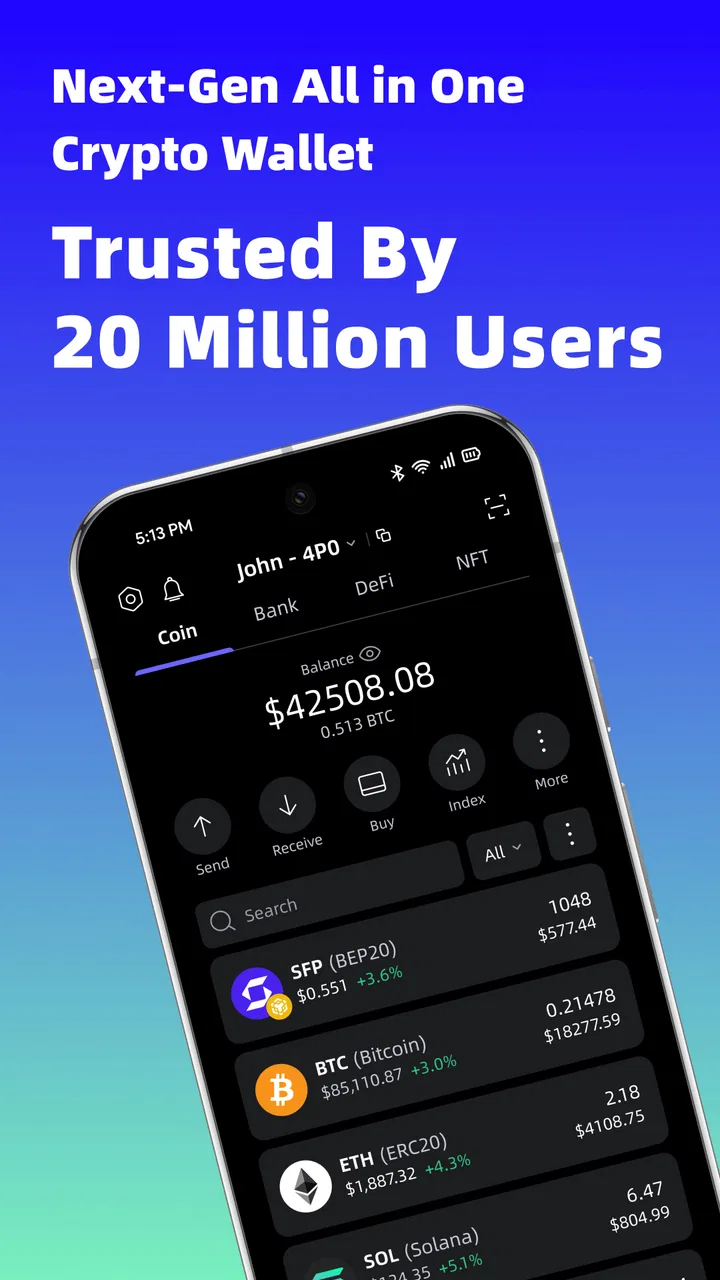
SafePal presents itself as a cryptocurrency wallet, but the important distinction is that it is designed around managing assets rather than merely watching prices. The store summary points to support for more than 10,000 tokens, and that breadth changes how the app feels in daily use. Instead of maintaining separate tools for every small token or NFT collection, I can think of it as a central control panel for a mixed portfolio.
You May Also Like

 Blood Strike: 2.5 Anniversary
Blood Strike’s Loadouts Turn Every Drop Into a Tactical Gamble
A close look at Blood Strike’s custom loadouts: how fast access to signature weapons reshapes its battle royale rhythm, rewards preparation, and narrows the gap between fights.

 Pandora - Music & Podcasts
Pandora’s Music Is Easy to Start, but Harder to Recover
Pandora’s strength is its low-effort path from a seed to a station. Its weak spot is how much confidence it asks you to place in connection, setup, and quiet recovery.

 8 Ball Pool
 Is Built on Rivalries, Rematches, and Routine
A close look at the rivalries, rematches, shared routines, and unanswered safety questions that turn a quick pool match into a persistent mobile community.

 Samsung Music
’s Quiet Strength Is Playing What You Already Own
Its reach comes less from spectacle than from dependable access to a personal library. That simplicity is both the app’s strongest retention engine and its ceiling.

 AccuWeather: Weather Radar
AccuWeather Review: A Quick, Clear Forecast for Everyday Decisions
For everyday plans, the best forecast is the one you can understand quickly. AccuWeather makes rain timing, radar, and local conditions easy to act on, with a few trade-offs.

 Hill Climb Racing
Why Hill Climb Racing Still Turns Crashes Into One More Run
A tiny car, a bumpy hill and one more upgrade: Hill Climb Racing keeps resurfacing because its simple chaos makes every near-miss feel personal.
More From Our News Desk



That does not mean every asset behaves identically. A token may use a different network, require a particular receiving format, or involve a transaction fee that is separate from the amount being sent. The app can put many assets in one place, but it cannot remove the underlying rules of each blockchain. I would therefore treat the large asset count as a reason to organize carefully, not as permission to send funds without checking the network.
The app is available at no purchase price, which makes trying it less financially demanding than buying a dedicated hardware wallet immediately. However, “free” needs to be understood correctly here. Installing the application does not make blockchain transactions free, and the app includes purchases ranging from $0.49 to $4.99 per item. Those are app-level purchases, while network fees and the market value of any asset are separate considerations. I would not judge the wallet solely by its free download or assume that every action inside it has no cost.
SafePal Wallet has been developing the product since May 26, 2019, and the current version is 4.11.8. For me, that matters less as a promise of perfection than as a sign that this is an established wallet rather than a brand-new experiment. The minimum operating-system requirement is Android 7.0, so many older Android phones can potentially run it, although I would still keep the operating system and the app updated wherever possible.
First setup and the responsibility it creates
The first important decision is not choosing a token; it is deciding how to protect the wallet itself. A non-custodial wallet places the recovery material in the user’s hands. That is empowering, but it also means a forgotten password, lost recovery phrase, or careless screenshot can create a much more serious problem than forgetting the login to a typical social app.
I recommend setting it up in a quiet place, away from cameras, shared desks, and cloud-backed note apps. Write down recovery information exactly as instructed, check it before moving any funds, and store it somewhere physically protected. Do not paste it into messages or save it in an image gallery. This is not a SafePal-specific trick; it is the basic discipline required by the type of wallet SafePal is.
A useful workflow is to create the wallet, explore the interface with no funds, and practice locating the receiving address before making a small test transfer. That test is especially valuable when moving an asset from an exchange, because the exchange and the wallet must support the same network. A familiar-looking token name is not enough. I would verify the network label, the first and last characters of the address, and the expected fee before confirming.
The most important SafePal feature is not a button inside the app; it is the control you keep over your recovery information. That control is also the largest source of risk. A polished interface can make a transaction feel routine, but the blockchain will not necessarily treat a wrong address as a correctable mistake.
Managing a varied portfolio without losing track
SafePal becomes more valuable when the user has assets spread across several networks or wants to keep NFTs alongside tokens. I found the central-wallet approach more convenient than repeatedly opening unrelated exchange accounts. It is easier to review what I hold, select an asset, and reach the send or receive workflow from one familiar environment.
The trade-off is that a single app can encourage a false sense of simplicity. A list of assets may look unified even though each item can have different fee requirements, confirmation behavior, and transfer rules. I would use clear labels for accounts and keep a separate record of why each wallet address exists. That small habit becomes useful if you later separate long-term holdings from funds used for regular transfers.
NFT management also benefits from organization. Collectibles are not interchangeable with ordinary fungible tokens, and their value can be harder to assess. I would avoid using the wallet as a display of presumed wealth and instead treat every NFT as an asset whose ownership, network, and destination need checking. Before sending one, confirm that the receiving wallet or marketplace supports the relevant format and network. The app can help centralize access, but it cannot make an incompatible destination compatible.
Another practical point is privacy. A public blockchain address can reveal transaction history to anyone who examines it. Using one wallet for every personal activity may be convenient, but it can also make your activity easier to connect. For users who care about separating purposes, multiple accounts or addresses may be preferable, provided the recovery process remains understandable and safely documented.
A realistic everyday use case
Imagine receiving a token payment from a friend after splitting a trip expense. I would open SafePal, select the intended asset, choose the receive function, and copy the address rather than typing it manually. I would then send the exact address through a trusted channel and ask the other person to confirm the network before transferring anything. Once the payment appeared, I would check the asset and amount in the wallet rather than relying only on a notification.
Later, if I needed to move part of that balance to an exchange, I would reverse the discipline: copy the exchange deposit address, inspect the selected network on both sides, and make a small test transfer when the amount justified the extra step. The wallet makes this workflow manageable, but it does not eliminate the need for it. A traditional bank transfer often offers clearer recipient details and more familiar recovery options; SafePal offers direct control, with more room for user error.
Value, limitations, and the right kind of user
I’d use this section to weigh SafePal’s broad, free-to-start wallet against the care self-custody asks of you. Its strongest fit is someone who wants mobile access to a varied crypto portfolio and is comfortable checking each transfer; someone seeking familiar account recovery may be better served by an exchange. The key trade-off is not just convenience, but whether you want the responsibility that comes with direct control.
Where the free access delivers real value
The strongest value is the low barrier to trying a self-managed wallet. I can install SafePal without paying an upfront purchase price, learn its layout, and decide whether its approach fits my habits before committing significant funds. That is useful for someone moving beyond exchange custody or wanting a dedicated place for tokens and NFTs.
Its broad asset focus is another meaningful advantage. A basic wallet that supports only one coin may be perfectly adequate for a single-asset holder, but SafePal is aimed at a more varied portfolio. Bringing many holdings into one app reduces the need to remember several interfaces and can make routine checking less fragmented.
The app is also a reasonable learning environment for people who want to understand wallet ownership in practice. By handling addresses, networks, confirmations, and recovery information directly, I get a clearer picture of what a blockchain transaction involves. That education has value, although it comes with consequences if I rush.
The included NFT orientation may appeal to users who do not want a separate collector-focused tool. Keeping tokens and collectibles within the same wallet can simplify the mental model for a small portfolio. I would still separate long-term holdings from experimental activity when possible, because convenience should not mean exposing everything to every connection or transaction.
Where the paid value needs careful judgment
The in-app purchase range is modest, but I would not buy anything simply because it appears in the wallet. The free application already provides the basic reason most people install it: managing crypto assets from a mobile device. Whether an optional purchase is worthwhile depends on the exact item, the problem it solves, and whether that problem is important to your own workflow.
This is where SafePal differs from buying a physical security product. A paid add-on, if relevant to your needs, should be evaluated as a specific convenience or protection-related purchase rather than as proof that the free wallet is incomplete. I would read the purchase description carefully, check whether it changes how I intend to use the wallet, and avoid treating a small price as a substitute for secure recovery practices.
The verified price information supports a clear conclusion: the entry cost is free, while some optional items cost between forty-nine cents and $4.99. It does not justify claiming that every advanced capability is included or that every purchase delivers the same value. For a casual user holding a small amount, spending nothing may be the sensible choice. For a committed user with a broader security plan, a paid option could be worth considering only after understanding its exact role.
Trade-offs compared with exchanges and simpler wallets
An exchange is usually easier for buying and selling because it combines custody, trading tools, and account recovery in one service. That convenience comes with dependence on the exchange. SafePal shifts the balance: I get more direct control over wallet access and can manage assets without leaving them entirely on an exchange, but I become responsible for recovery and transaction accuracy.
A single-coin wallet is often less intimidating. Its narrower scope can reduce the number of network choices and make the interface easier to understand. SafePal’s support for a much wider collection of tokens is more useful for a diversified holder, but that same breadth can create more opportunities to select the wrong asset or network.
Desktop wallets may offer a larger workspace for detailed review, while SafePal’s phone-first format is convenient for checking a balance or approving a transfer away from a computer. I prefer the mobile approach for quick access, but I would avoid making high-value transfers while distracted, on an unfamiliar network, or with a low battery. Convenience is helpful only when it does not encourage rushed confirmation.
Hardware wallets can be a better fit for someone whose priority is keeping long-term holdings separated from a frequently used phone. SafePal’s free mobile entry point is more approachable, but a phone wallet is still part of a broader device-security picture. If your holdings are substantial enough that a dedicated hardware solution would materially improve your peace of mind, the mobile app should not be treated as a universal replacement.
Who will get the most from SafePal
I would recommend SafePal to an Android user who wants a broad cryptocurrency and NFT wallet, is willing to learn the basics of self-custody, and values having many assets in one place. It is particularly suitable for someone transitioning away from leaving every holding on an exchange, or for a collector who wants tokens and NFTs accessible through one mobile application.
It can also suit a careful beginner, but “beginner-friendly” should not be confused with risk-free. The interface may be easier to approach than the underlying technology, yet the user still needs to understand recovery phrases, public addresses, networks, and transaction fees. I would start with small amounts and use the app as a learning tool before treating it as the home for important savings.
I would skip it if you want a bank-like experience, automatic recovery through identity checks, or a support process that can undo a mistaken blockchain transfer. I would also look elsewhere if you hold only one asset and prefer the simplicity of a specialist wallet, or if your main need is active trading rather than personal custody. In those situations, an exchange or a narrower product may feel more natural.
Users who regularly share devices, install apps from uncertain sources, or struggle to keep recovery information private should pause before using any self-managed wallet. SafePal cannot compensate for an exposed phone, a copied recovery phrase, or a deceptive transaction approval. The app’s convenience is valuable only when the surrounding habits are dependable.
My buy-or-skip verdict
My verdict is to try SafePal without paying first if you need a multi-asset mobile wallet and are prepared to take custody seriously. The free entry point makes experimentation accessible, and the combination of token and NFT management gives it a clear purpose beyond a simple balance viewer. Its 4.5 average and audience of over 5 million installs suggest that many users find the approach workable, but those figures should not replace your own security checklist.
I would not buy optional items automatically. The app’s purchase range is clear, but the value of any paid item depends on the particular need it addresses. Start with the free experience, learn the transfer flow, and decide only after you understand what the purchase changes. Keep blockchain network fees separate from in-app spending when planning your budget.
After using it, I see SafePal as a practical middle ground: broader than a minimal single-asset wallet, more self-directed than an exchange account, and easier to start with than a dedicated hardware setup. Its weakness is inseparable from its strength. You control more, so you must verify more. For me, that makes it a good recommendation for careful crypto users and a poor recommendation for anyone looking for ordinary financial-app forgiveness.
If you install it, begin with no funds, secure the recovery information offline, create a simple naming system for accounts, and test a small transfer before moving anything important. Those steps will tell you more about whether SafePal fits your habits than a feature list can. In my experience, that is the fairest way to judge this particular finance app: not by how quickly it lets you tap through a transaction, but by whether it helps you manage a varied wallet without forgetting who remains responsible for every final decision.
FAQs for SafePal: Crypto Wallet BTC NFT
01What is SafePal: Crypto Wallet BTC NFT, and what can I use it for?
SafePal is a non-custodial cryptocurrency wallet designed for storing, sending, receiving, swapping, and managing digital assets. The app supports many popular cryptocurrencies, including Bitcoin and various tokens, and also provides access to NFT management and selected decentralized applications. Because it is non-custodial, you control the wallet’s recovery phrase and private keys rather than SafePal holding them for you.
02Is SafePal safe to use for storing cryptocurrency and NFTs?
SafePal includes security features such as encrypted wallet data, password protection, biometric access on supported devices, and transaction confirmation tools. However, no wallet can protect funds if users expose their recovery phrase, approve malicious transactions, or install fake applications. During testing, the most important security responsibility remained with the user: download only from official stores, verify addresses carefully, and never share the recovery phrase.
03Does SafePal charge fees for transactions, swaps, or NFT activity?
Downloading and creating a SafePal wallet is generally free, but using blockchain networks still involves network fees. These fees are paid to the relevant blockchain and can change depending on congestion, transaction type, and asset. Swaps or other integrated services may also include spreads or service charges. Before confirming an operation, review the displayed amount, network fee, exchange rate, and any additional cost.
04Can I recover my SafePal wallet if I lose my phone or delete the app?
You can usually restore a SafePal wallet on another compatible device if you still have the correct recovery phrase and follow the wallet restoration process. SafePal cannot recover funds for you if the phrase is lost, typed incorrectly, or exposed to someone else. Write the phrase down offline, check its accuracy, and store it securely. Never save it in screenshots, cloud notes, email, or chat messages.
05What should I know before using SafePal for DeFi, NFTs, or token swaps?
SafePal can provide access to features such as token swaps, NFT management, and decentralized applications, but these services involve additional risks beyond simply holding cryptocurrency. Blockchain transactions are often irreversible, and unfamiliar dApps may request permission to move assets or interact with your wallet. Check contract addresses, understand approval requests, confirm the correct network, and avoid projects promising unrealistic returns before signing anything.
Pros
- Supports many cryptocurrencies
- including BTC
- ETH
- tokens
- and NFTs.
- Hardware wallet integration adds an extra layer of protection for private keys.
- Built-in swap and trading tools make portfolio management more convenient.
- Non-custodial design gives users control over their recovery phrase and funds.
- Available on Android and iOS with a consistent interface across devices.
Cons
- Losing the recovery phrase can permanently make wallet funds inaccessible.
- Some swaps and purchases may include network fees or third-party charges.
- The wide range of features can feel overwhelming for beginners.
- Customer support options may be limited compared with centralized exchanges.
- Transactions depend on blockchain confirmations and can sometimes be delayed.

SafePal: Crypto Wallet BTC NFT
Gallery